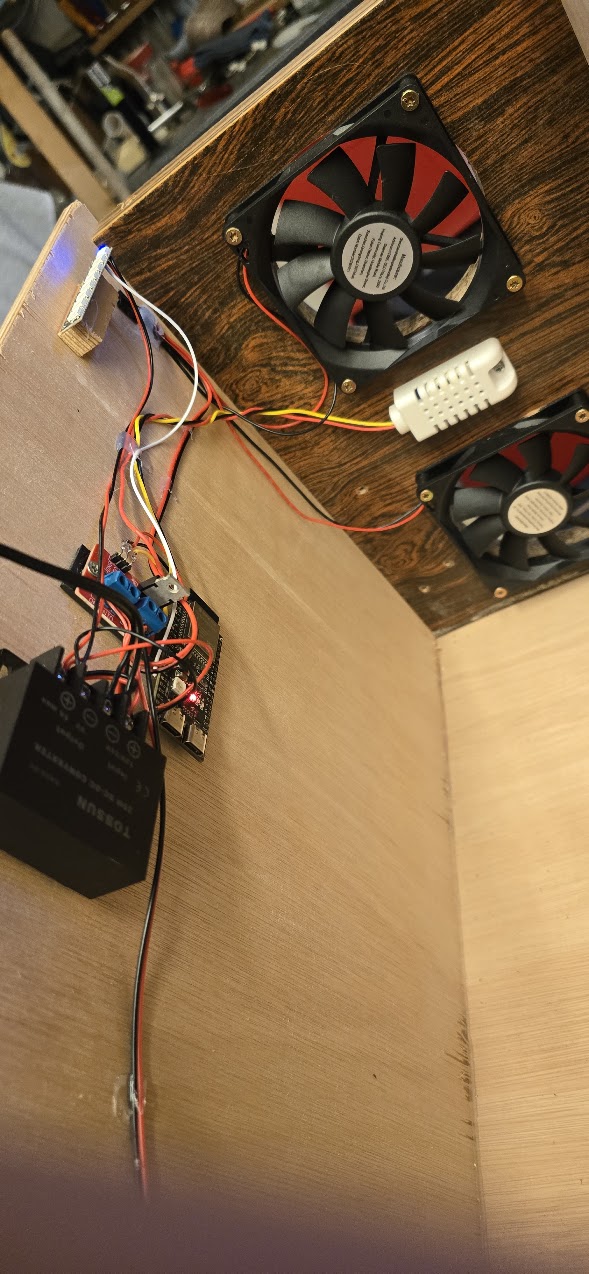
What started as a simple wooden box with four fans has evolved into a fully autonomous, temperature-controlled cooling system. My homemade Cooling Tower automatically adjusts its fan speed, displays the temperature using a colourful LED bar, and sends monitoring data to Home Assistant and Grafana.
And the best part? It's practically silent.
## From Four Fans to Intelligent Cooling
The original idea was simple: electronic equipment generates heat, and that heat needs somewhere to go. But why have fans running at full speed all the time when they don't need to?
The Cooling Tower uses four 12V fans controlled by an ESP32-S3 microcontroller.
A DHT22 sensor measures temperature and humidity every ten seconds. Based on these readings, the ESP32 automatically determines how much cooling is needed.
Below 20°C, the fans remain off. As the temperature rises, they gradually increase their speed. At 30°C and above, all four fans run at full power.
Fan speed is controlled using **PWM (Pulse Width Modulation)**, which rapidly switches the power supplied to the fans.
The result is efficient cooling without unnecessary fan noise.
## A Thermometer Made of Light
Mounted on the outside of the Cooling Tower is a vertical strip of eight individually addressable WS2812B RGB LEDs.
Together, they form a colorful temperature indicator.
At low temperatures, a single blue LED lights up at the bottom. As the temperature increases, the illuminated bar grows upward, progressing through blue, cyan, green, yellow, orange, and finally red.
This provides an instant visual indication of the temperature without having to check a computer or smartphone.
If the temperature sensor fails or stops providing valid readings, all eight LEDs flash red. As a precaution, the ESP32 also commands the fans to run at full speed. And when things really(!) get hot, a smart-plug turns all the power off.
## Fully Autonomous, Yet Connected
One of the most important design decisions was to make the Cooling Tower independent of Home Assistant.
All temperature monitoring and fan control logic runs directly on the ESP32 using ESPHome.
This means the system continues operating even if Wi-Fi becomes unavailable or Home Assistant goes offline.
Home Assistant adds convenient remote monitoring and control. From a smartphone or computer, I can check temperature and humidity, manually adjust fan speed, switch between automatic and manual operation, and control the RGB lighting.
In other words, Home Assistant provides the interface, but the ESP32 does the actual thinking.
## Grafana: Turning Measurements Into Information
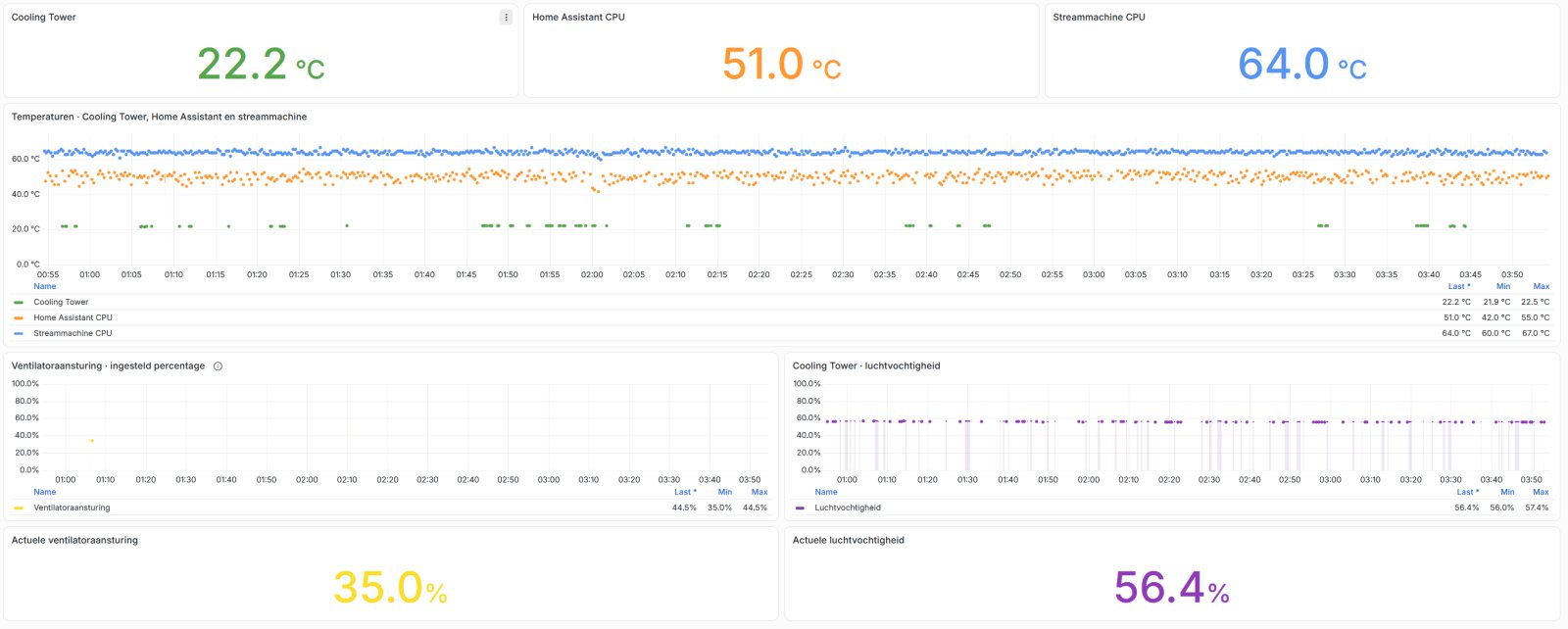
The latest addition to the project is a dedicated monitoring dashboard built with Grafana, using data collected through Home Assistant and stored in InfluxDB.
The dashboard brings together several useful measurements:
- Cooling Tower ambient temperature
- Home Assistant PC server CPU temperature
- Stream-machine PC CPU temperature
- Cooling Tower fan speed percentage
- Relative humidity
During a recent monitoring session, the Cooling Tower measured an ambient temperature of **22.4°C**, while the Home Assistant CPU was running at 47°C and the Stream-machine CPU at 64°C.
The historical graphs make it possible to observe temperature trends, compare different systems, and eventually investigate how changes in fan speed affect the surrounding environment.
The CPU temperatures and ambient temperature are different measurements, of course, but having them together in one dashboard provides a useful overview of the equipment environment.
## What's Under the Hood?
Despite its capabilities, the Cooling Tower is built from relatively inexpensive, commonly available components.
| Component | Purpose |
|---|---|
| ESP32-S3 | Main controller |
| DHT22 | Temperature and humidity sensor |
| 4 × 12V DC fans | Air circulation |
| MOSFET switching module | PWM fan speed control |
| 8 × WS2812B RGB LEDs | Visual temperature indicator |
| 12V power supply | Fan power |
| 12V-to-5V buck converter | ESP32 and LED power |
| ESPHome | Autonomous control software |
| Home Assistant | Remote monitoring and control |
| InfluxDB + Grafana | Historical data and visualization |
The fans are controlled together using a single PWM output from the ESP32, while the eight RGB LEDs require only one additional data pin.
The entire system is powered from a 12V supply, with a small buck converter providing the necessary 5V for the electronics.
## From a Wooden Box to a Smart Cooling System
This project started with a few holes in a wooden enclosure and four inexpensive fans.
Along the way, there were a few technical challenges, particularly finding a suitable MOSFET switching solution and eliminating the whining noise caused by PWM.
But that's part of the fun of DIY electronics: experimenting, troubleshooting, learning, and gradually improving a design until everything works together.
The result is a compact cooling system that measures, decides, adjusts, and reports all without requiring constant attention.
It runs autonomously, uses only as much cooling as necessary, and provides both a physical temperature display and detailed historical monitoring.
**Cooling Tower: Operational.** 🖖
*Designed and built as a DIY project, powered by ESPHome and integrated with Home Assistant, InfluxDB, and Grafana.*
News page added
Been updating the webpage today and from now on it will have a news section.